Branded Search Growth as a KPI: The Metric That Shows Whether AI Search Is Helping Your Brand
A branded search KPI tracks how many people search for your company by name, and it is the simplest way to see whether AI search is helping your brand. If more people type your...
A branded search KPI tracks how many people search for your company by name, and it is the simplest way to see whether AI search is helping your brand. If more people type your name into Google each month, your brand demand is growing, whatever happens to rankings and clicks on generic queries. You can pull it today from Search Console and GA4, and this guide walks through the setup.
Why rank and CTR no longer show AI search’s real impact
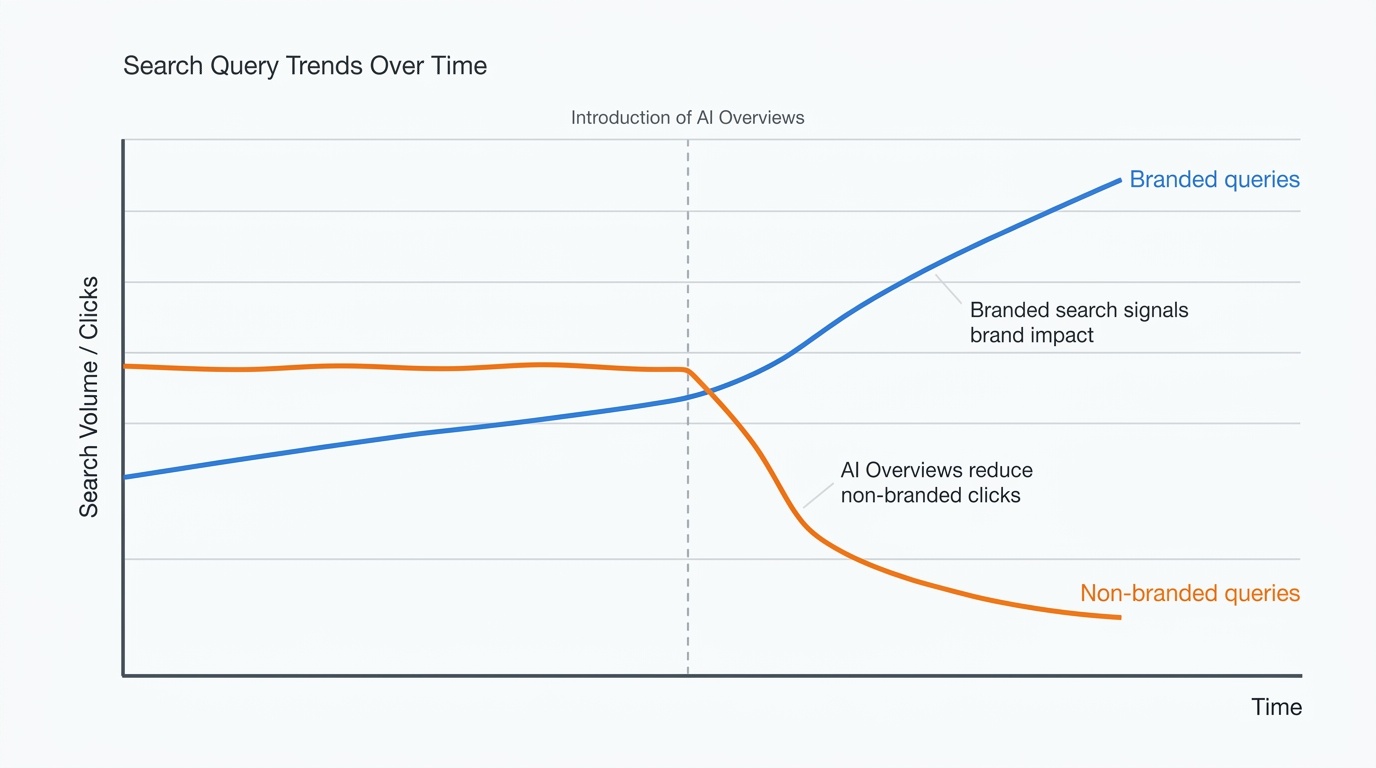
AI Overviews are cutting non-branded clicks
Ahrefs found that an AI Overview correlated with a 34.5% lower click-through rate for the top-ranking page across 300,000 keywords. A later Ahrefs update put the drop at 58%. Neil Patel’s dataset shows informational queries losing up to 61% of CTR when AI Overviews appear.
Your page can hold position one and still lose most of its clicks. A report built on rank and CTR then shows a decline you can neither explain nor fix.
The case for a brand demand metric in SEO reporting
Someone who sees your name in an AI answer may never click. They may still remember you and search for you a week later. That return visit shows up as a branded query, which makes it a brand demand metric SEO teams can count.
It also sits closer to revenue than rank does. People who search your name already know who you are, so they convert at a different rate than people researching a problem.
What a branded search KPI measures
Branded vs non-branded clicks: defining the split
A branded query contains your company name, your product names and the common misspellings of both. Add the names of founders or executives if people look them up to find you. Everything else is non-branded, including searches for competitors.
The split matters because the two groups behave differently. Branded clicks come from people who already know you. Non-branded clicks come from people still comparing options, and that is where AI Overviews take the most traffic. Report them separately, because a blended number hides both trends.
Branded search volume and AI search: how they connect
AI search exposes your brand to people who never visit your site. Some of them come back and search for you by name. That is the link between branded search volume and AI search, and you can see it in Search Console impressions for branded queries.
Treat it as a direction, not a proof. A rise in branded demand fits with AI exposure, but it does not show that AI caused it.
How to measure branded search growth
Pull branded query clicks and impressions in Search Console
List your brand terms: company name, product names, spacing and hyphen variants, and frequent misspellings.
Open Performance, then Search results. Use Google’s native branded queries filter if your property has it. Otherwise add a Query filter set to “Custom (regex)”.
Write a pattern that catches your variants, such as growth ?rocket|growthrocket. Only the Query and Page filters support regex in the Search results report.
Record clicks and impressions for the month, then compare with the previous month and the same month last year.
Run the same filter as an exclusion to get non-branded clicks and impressions.
Search Console keeps about 16 months of data, so export your numbers now to start a history you own.
Read direct and brand traffic in GA4
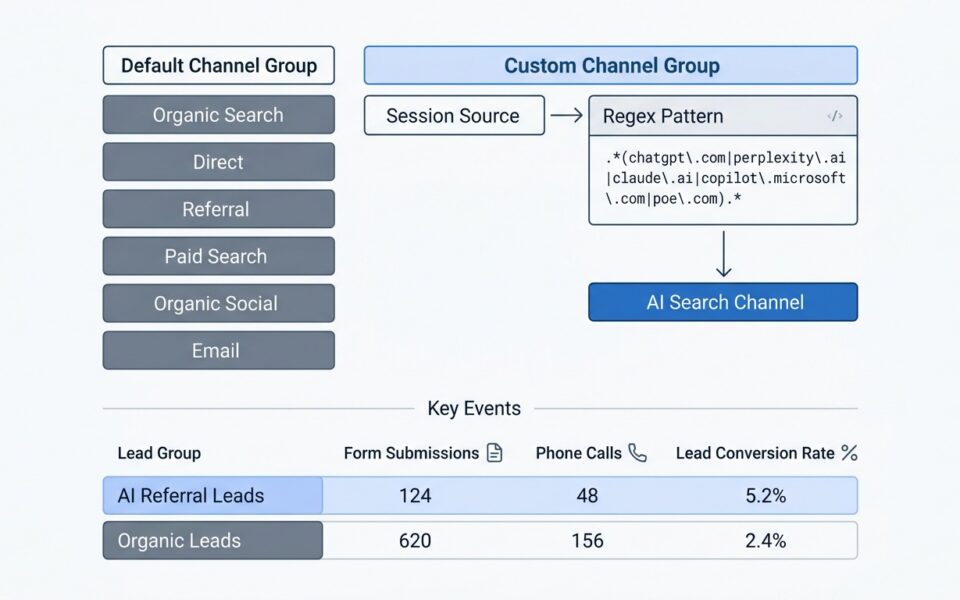
GA4 does not show search queries, so use proxies. Open Reports, then Acquisition, then Traffic acquisition, and note monthly sessions in the Direct channel. Then check organic sessions landing on your homepage, since most branded searchers land there.
Add key events (your lead form submissions or demo requests) for each group. Direct traffic includes untagged links and dark social, so read it as a trend line. A steady climb alongside rising branded impressions is a good sign. A jump with no matching branded movement usually means a tagging change or a campaign.
Track AI mentions alongside search data
Build a fixed list of 20 to 30 prompts that a buyer in your category would ask. Run them monthly in Google AI Overviews, ChatGPT, Perplexity and Gemini. Log whether your brand appears, where it sits in the answer, and whether the tone is positive, neutral or negative.
Keep the prompts identical every month, or the comparison breaks. The result is a simple mention rate you can put on the same chart as branded impressions.
Measuring brand impact in AI Overviews: what the data shows
The +18.7% branded CTR finding and its limits
Neil Patel’s dataset reports that branded queries with AI Overviews gained 18.7% in CTR. It is the only positive entry in the data, which makes it a useful counterpoint to the losses on informational queries. It is also a thin basis for a strategy, for four reasons:
It comes from one vendor’s marketing dataset, not a peer-reviewed sample.
Branded queries that trigger an AI Overview are a small, self-selected slice of all branded searches.
Navigational intent lifts branded CTR on its own. Someone searching your name usually wants your site.
PR, paid media and offline activity also move branded demand, so you cannot credit AI exposure alone.
Use the figure to show that branded queries behave differently from informational ones. To measure brand impact from AI Overviews on your own site, rely on your own trend lines.
Brand mentions correlate with AI visibility
Ahrefs analyzed 75,000 brands and found that web brand mentions had the strongest correlation (0.664) with brand visibility in AI Overviews. It also found that 26% of brands have no mentions in AI Overviews at all.
This is correlation, but it gives you a practical reading. Brands that get talked about get surfaced, and brands that get surfaced get searched. If your mention rate is zero, expect branded growth to come from elsewhere.
Reporting branded search growth as a leading indicator
Build the monthly branded demand report
Keep it to one page. Each month, include:
Branded clicks and impressions from Search Console, with month-over-month and year-over-year change.
Non-branded clicks and impressions, so the AI-driven losses stay visible.
GA4 Direct sessions and organic homepage sessions.
AI mention rate from your prompt set, with a note on any change.
Any campaign, launch or press hit that month, so spikes have an explanation.
Annotating events is what makes the report credible. When a boss asks why branded impressions jumped in March, the answer is already on the page.
Show branded demand next to lead volume
Put branded impressions and monthly leads on one chart. Set the first month of each to 100 so the two lines share a scale. When both rise together, the link explains itself without a lecture.
Divergence is where the chart earns its keep:
Demand up, leads flat: check landing pages, form friction and sales follow-up speed. People are finding you and something is stopping them.
Demand flat, leads up: look at paid and referral sources. The lift probably isn’t coming from brand awareness.
Demand down, leads steady: you may be living off past awareness. Check your mention rate and recent PR.
Give it a few months of data before drawing conclusions. One month is noise, and a quarter starts to show a pattern.
Get a branded search report built for your team
If you would rather not wire this up alone, Growth Rocket can build the report with you. On a call we will set up your branded query filter, connect Search Console and GA4, create your AI prompt set and lay out the lead-volume chart so it is ready for your next leadership meeting. Book a call and bring your current SEO report.
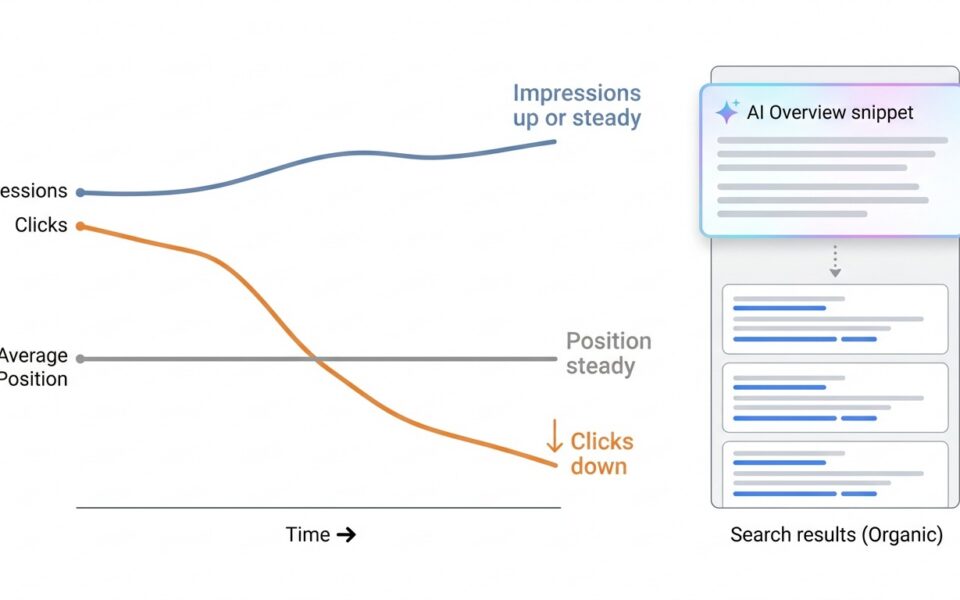
If Search Console shows clicks falling while impressions and average position hold steady, you most likely have a click-through problem, not a ranking loss. AI Overviews answer the...
How to track ChatGPT traffic in GA4 (and tie it to leads) To track ChatGPT traffic in GA4, open Reports > Acquisition > Traffic acquisition, switch the dimension to session...
HTTP/2 is a significant upgrade from HTTP/1.1, offering faster page loading times, reduced latency, and improved security. It's essential for modern websites, especially those with resource-heavy content or a focus on mobile performance.